
SHOPIFY CSV EDITOR · FOR WINDOWS
Edit your Shopify CSV.
Without Excel breaking it.
Excel turns barcodes into 1.23E+11 and drops the zeros from your SKUs. Speedy CSV keeps every cell exactly as you typed it, so what you upload is what you meant.
US $99 introductory price Normally $149
One payment, no monthly fee Lifetime licence for purchased version 1 year of updates Up to 3 computers Free version: no time limit, up to 25 products or 500 rows
SOUND FAMILIAR?
The spreadsheet made it worse.
Your SKUs lost their zeros.
Excel turned 00123 into 123 and barcodes into 1.23E+11. Speedy CSV stores every cell as plain text and never “helps” by converting it.
Your product names came back garbled.
Café became Café. One button repairs common character mix-ups, and you see every change before it’s applied.
Shopify said “imported”, but a product is missing.
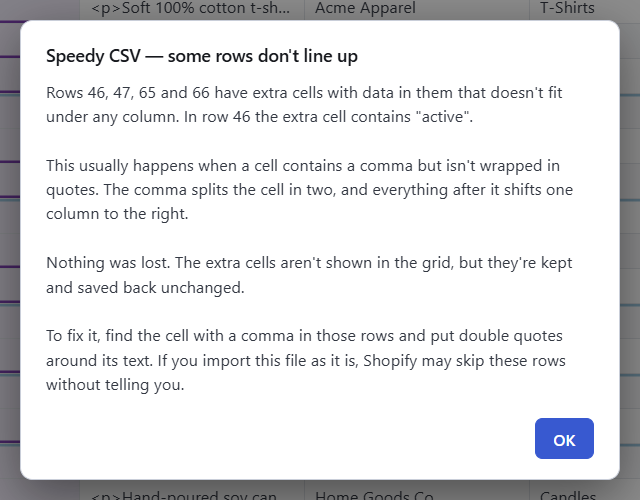
One stray comma can push a row out of line, and Shopify may skip that row without telling you. Speedy CSV spots rows that don’t line up the moment you open the file.
Burnt out by subscription fatigue.
Every tool wants another monthly fee. Speedy CSV is yours for one payment, so you can use it every day on as many products as you want without your bill growing.
You’d rather not give an app access to your whole store.
Speedy CSV never connects to your store. Your file stays on your computer until you upload it yourself.
100,000
rows
BUILT FOR BIG CATALOGUES
Open in about a second.
Speedy CSV fully opens a 100,000-row store file in about a second. Scroll, search and edit without waiting for a spreadsheet to catch up.
TRY IT FIRST
Try Speedy CSV free,
on your own store’s file.
Open your full Shopify product export and see every problem Speedy CSV finds, with all 24 checks.
Edit, clean up and bulk-edit as much as you like. The free version saves and exports up to 25 products or 500 rows, with no time limit and no credit card needed.
A licence key gives you unlimited products and rows. It unlocks the app you already have, so there’s nothing to reinstall.
HELP THAT’S BUILT IN
Never wonder what
the app is telling you.
Messages in plain English.
When something needs your attention, Speedy CSV says what happened, what’s safe, and what to do next. No error codes and no jargon.
Point at anything to learn more.
Hover over a button or a warning in the bottom bar and it explains itself. Prefer a cleaner screen? Turn the hover tips off in Settings.
A ? for every part of the app.
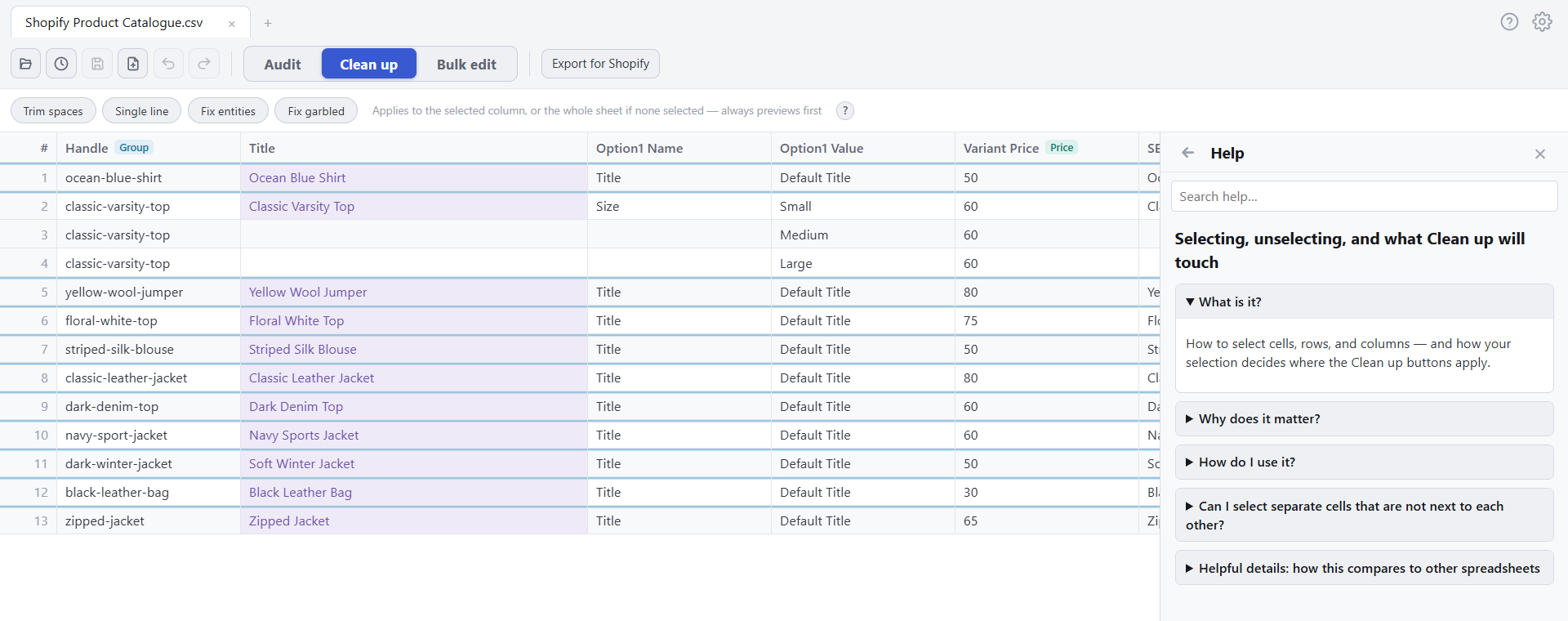
Audit, Clean up and Bulk edit each have their own ? button. Click it and the help for that section opens right beside your work.
A full help guide inside the app.
17 plain-language help topics, readable in the app with no internet connection. They cover everything from grouped variants to exporting for Shopify.
01 / CLEAN UP
Clean the text.
Skip the formulas.
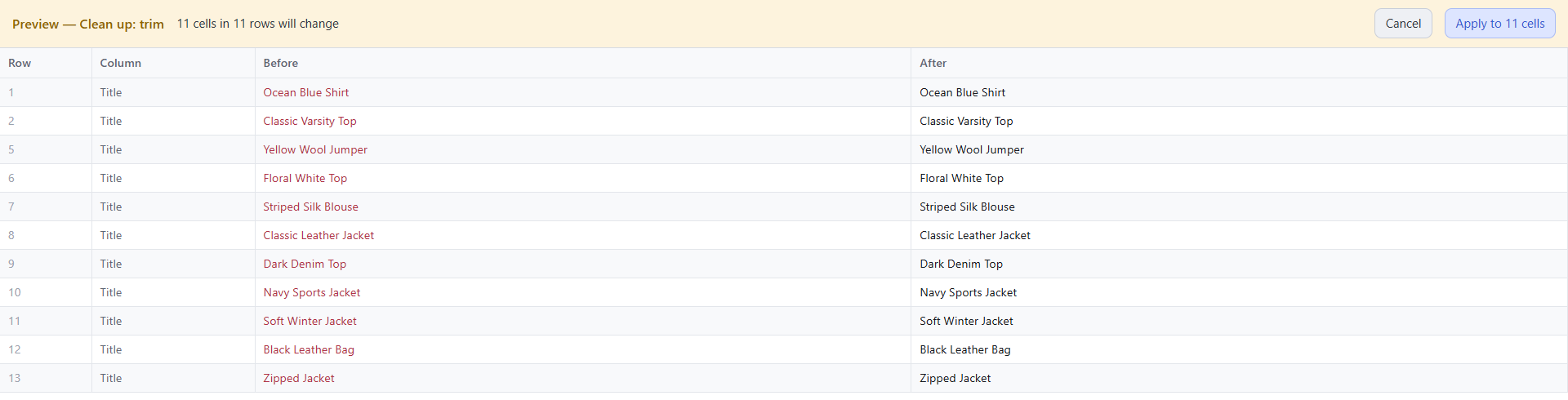
Choose a cleanup button and see the proposed fixes before you apply them. Work on one column, or the whole sheet when no column is selected.
Trim spaces
Remove spaces at the start and end, collapse double spaces and strip common invisible characters.
Fix garbled text
Repair common character mix-ups, such as Café → Café and € → €.
Fix HTML entities
Turn Soft cotton into Soft cotton.
Make text one line
Replace hidden line breaks with spaces where you need a single-line value.
Choose the fix. Review the before and after. Apply it, or cancel.
02 / BULK EDIT
One change.
Many cells. Done.
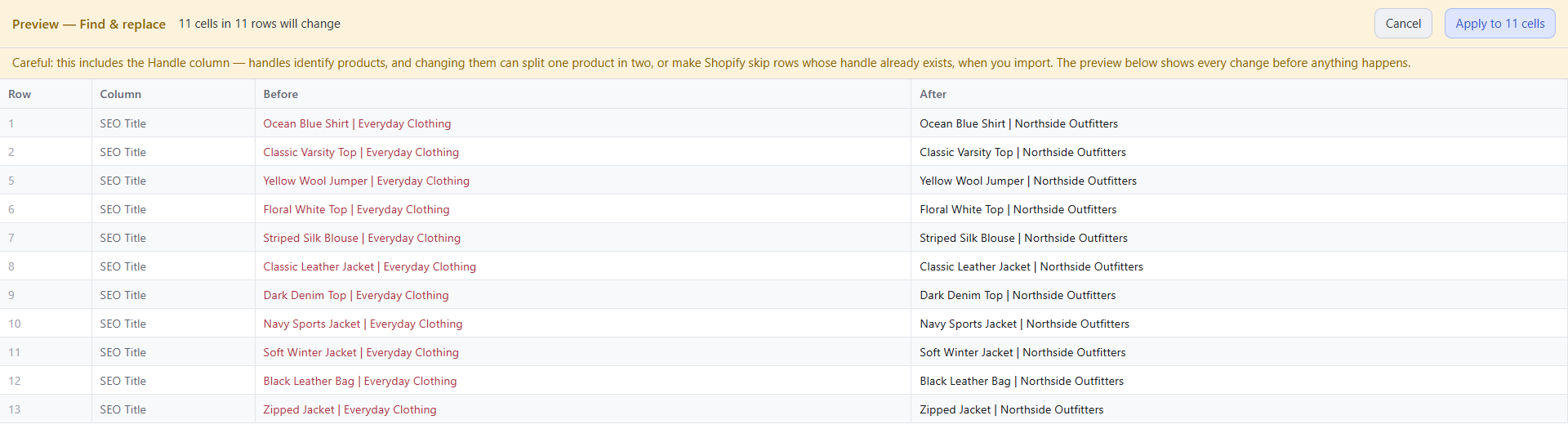
Update repeated text without building a formula for every task. Choose the change and where it applies, then check the preview before applying it.
Find & replace
Swap an old name or phrase throughout your selection.
Prefix & suffix
Add the same start or end to your text.
Spaces & case
Use hyphens or underscores. Apply Title Case, lower case or UPPER CASE.
Number rows
Create a sequence from your chosen starting value.
Changed your mind? Use Undo.
MADE FOR PRODUCT CATALOGUES
Product variants,
right where they belong.
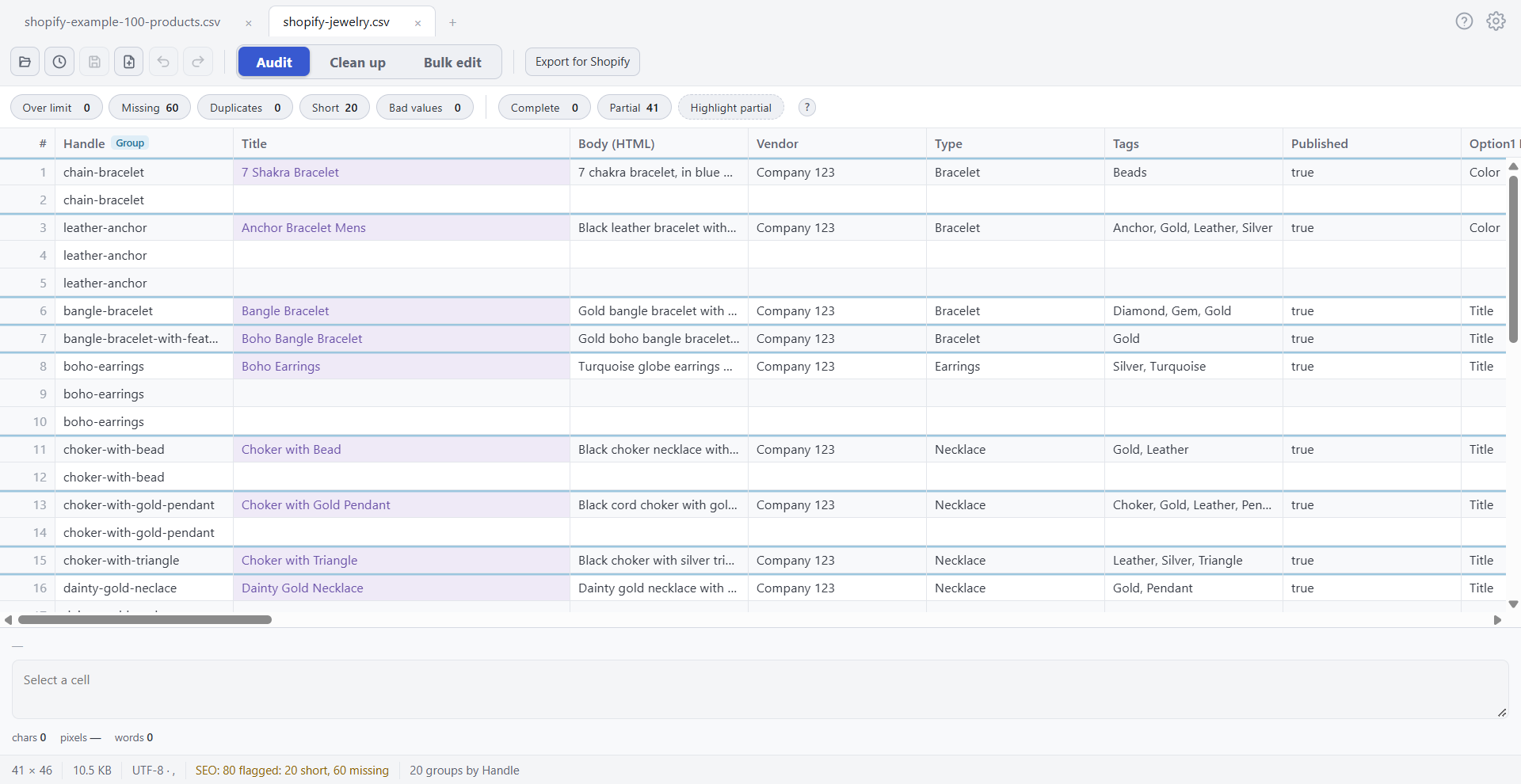
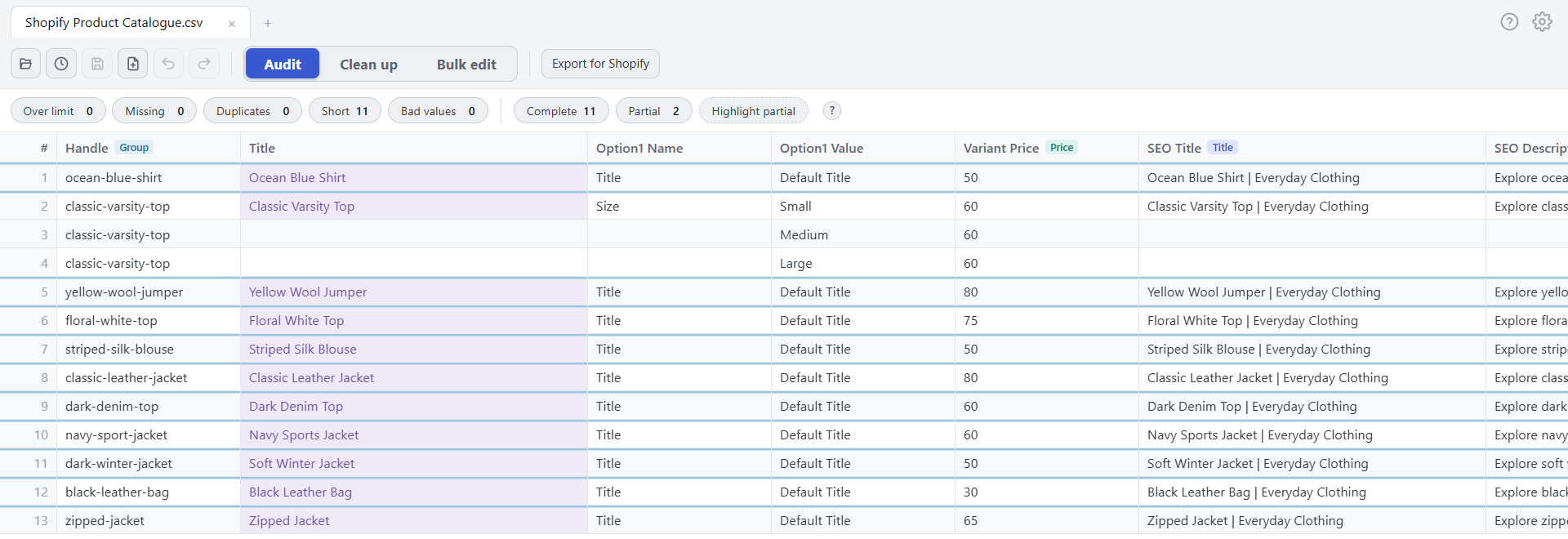
Rows are grouped by product Handle, so each product and its variants stay together as you edit. Speedy CSV also warns you when a product’s rows have been split apart, a common result of sorting in a spreadsheet. Grouping changes the view, never your file.
COLOUR THAT MEANS SOMETHING
See what needs fixing
before you read a word.
Speedy CSV uses two levels, everywhere. Amber means “improve this”: Shopify will import it fine. Red means something is wrong: fix it before you upload.
Cells
Too long, too short, empty or impossible values each have their own colour. Empty cells are always in italics.
Groups
A blue line marks where each new product starts, so variants never blur together.
Messages
The bottom bar uses the same colours: amber to improve, red to fix, green when it worked, blue for what’s switched on.
Light or dark
Pick the theme you like. The colours keep their meaning and stay readable in both.
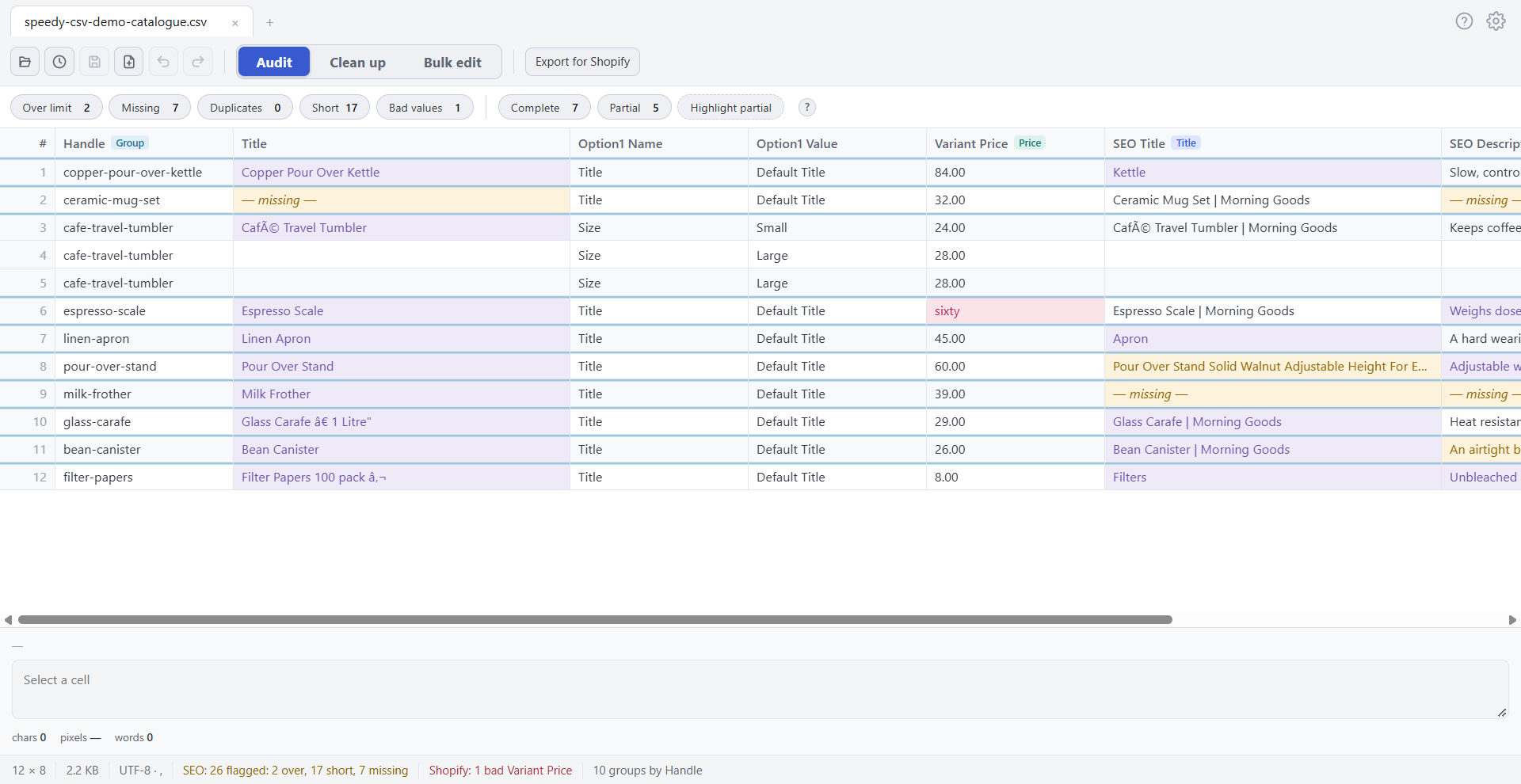
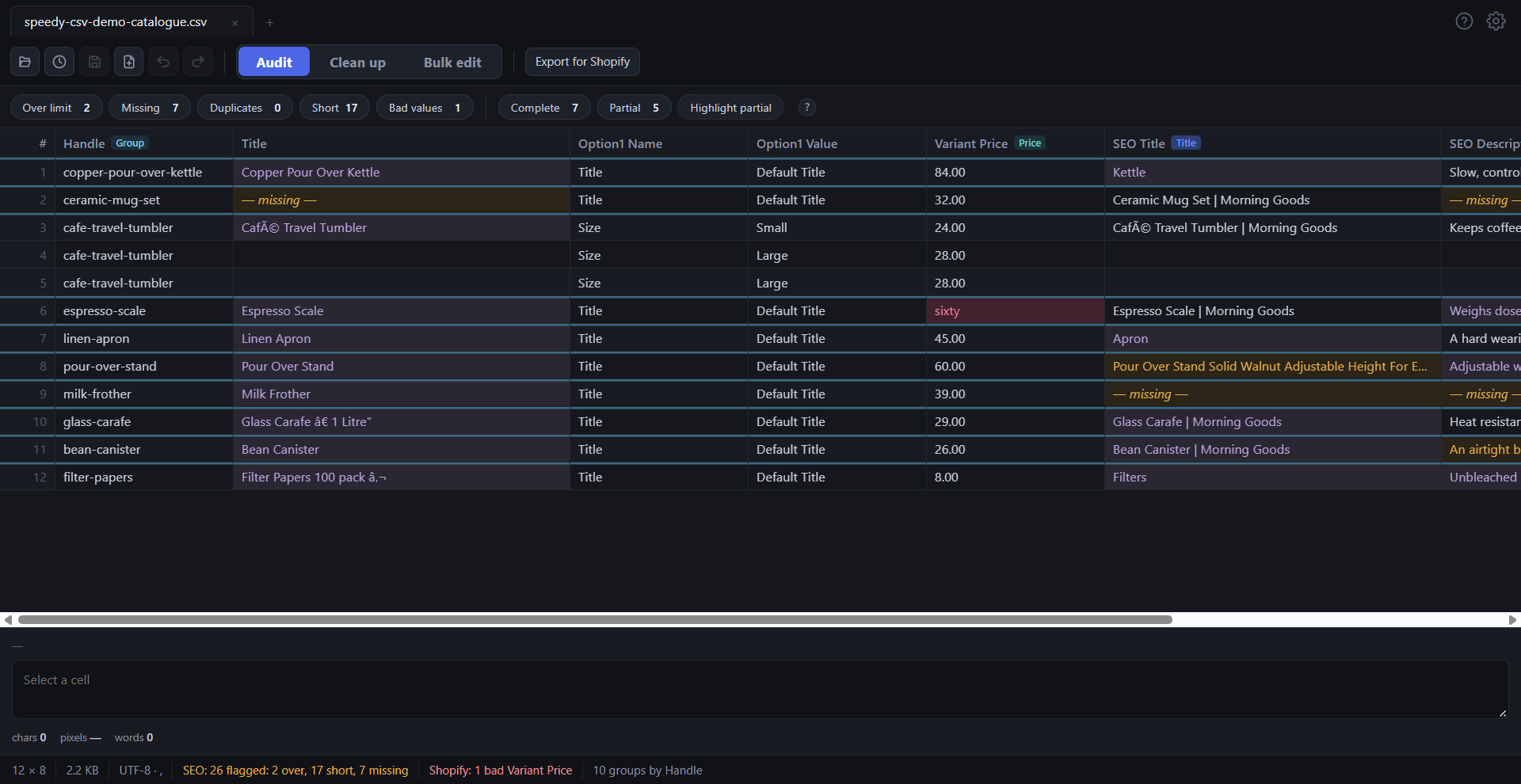
Colours are only marks on screen. Nothing is changed in your file until you edit it.
03 / CHECK & EXPORT
24 checks
before Shopify sees your file.
Before you import, use Export for Shopify to check your file for common problems:
Missing or blank product handles
Duplicate variant combinations
Products with no title, and variants with no price or fulfillment service
Quote marks that make Shopify stop with "Illegal quoting"
Unexpected or missing column names
Rows that don’t line up, and other file issues
Results separate problems to fix from things worth reviewing, and take you to the affected data.
Checks use your CSV, not your live store. Always review Shopify’s import preview and results.
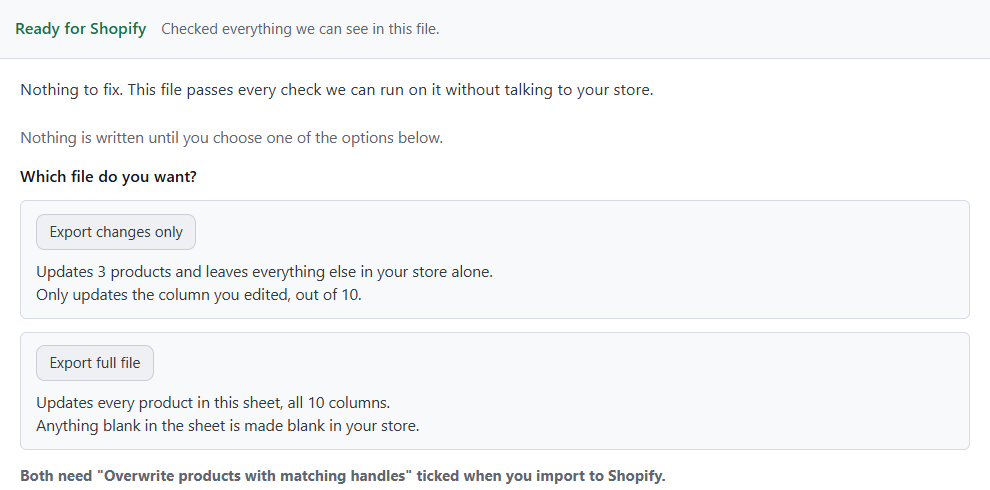
Only changed a few products?
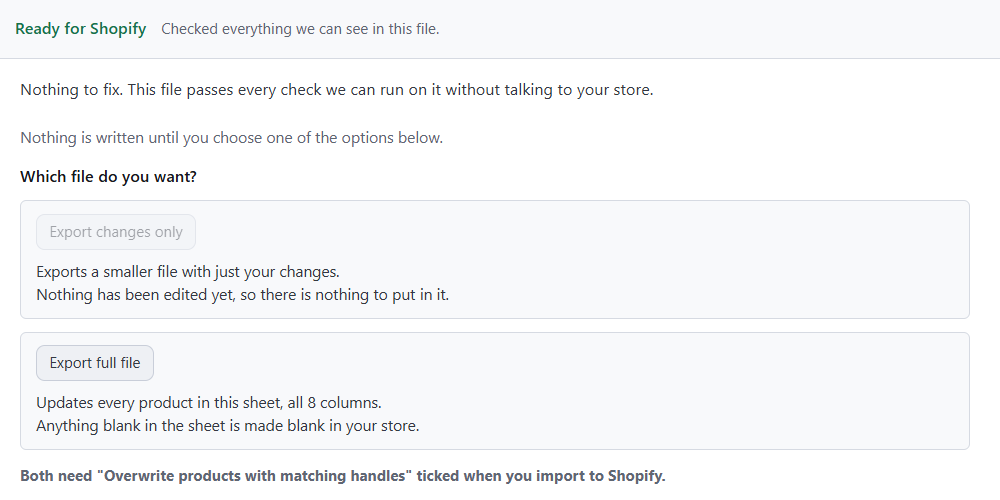
Export changes only creates an update for the existing products you edited, with the supporting fields and every row for each product. Use Export full file for the whole sheet or for new products.
BIG CATALOGUE? NO PROBLEM
A quick, easy way around
Shopify’s 15 MB import limit.
Shopify only imports product CSV files up to 15 MB. Big uploads take longer and are more likely to time out, so the cap keeps imports reliable for every store. But exporting has no such cap: a big store can easily export a file it can’t import back.
The usual fix is to split the file into pieces, keep every product’s rows together, and import each piece one at a time. It’s slow, and one bad cut can break a product.
Speedy CSV keeps most updates well under the limit. Export changes only saves just the products and columns you edited, so you upload what changed, not your whole catalogue.
Far less splitting, and fewer imports to babysit
Smaller uploads that finish quickly, with less chance of a time-out
Everything you didn’t touch stays exactly as it is in your store
Adding new products or moving a whole catalogue still needs the full file, and Speedy CSV doesn’t split files for you.
SEO HELP, RIGHT IN THE EDITOR
Give your product text
another pair of eyes.
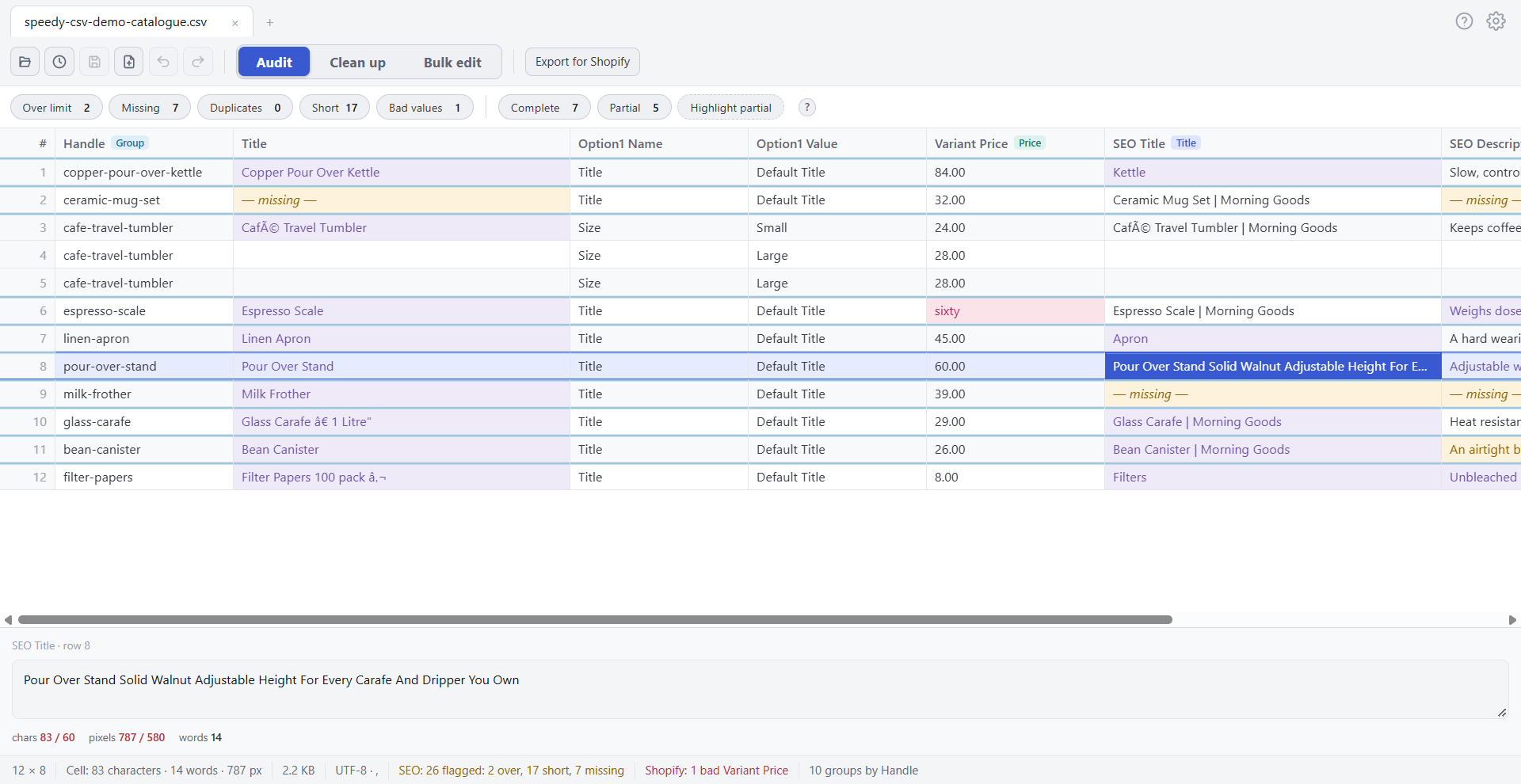
Edit product titles, SEO titles, descriptions and image alt text in one place. Colour-coded length guidance, by pixel width and by character count, shows which text is too long or missing while you work.
Adjust the limits to suit your store.
A FAMILIAR WORKFLOW, WITHOUT THE RISK
From exported file to safe upload.
1
Export from Shopify
Start with your product CSV.
2
Open, clean and edit
Use the cleanup and bulk tools, and review each preview.
3
Check and export
Fix what the 24 checks find, then save.
4
Import to Shopify
Nothing in your store changes until you upload.
INTRODUCTORY OFFER
Pay once.
Edit with confidence.
Speedy CSV for Windows
US $99 Normally $149
Introductory price · Save US $50
One payment, no monthly fee
Lifetime licence for purchased version
Includes 1 year of updates
Use it on up to 3 computers
Built-in help and plain-English messages
A few things you might be wondering.
Is this a subscription?
No. You pay once for a lifetime licence for the version you purchase, with 1 year of updates included. You can use it on up to 3 computers.
Is there a free trial?
There’s something better: a free version with no time limit. It opens files of any size and runs every check. It saves and exports up to 25 products or 500 rows. A licence key gives you unlimited products and rows.
What happens after the first year?
Your licence never expires, so you can keep using the version you purchased. Updates for the first year are included. After that, new versions aren’t included, and older versions aren’t guaranteed to keep working with future changes to Shopify’s CSV format or to Windows.
Does Speedy CSV connect to my Shopify store?
No. It edits a CSV file on your computer. Nothing in your store changes until you upload the file through Shopify yourself. Speedy CSV goes online only to activate your licence and to check it occasionally.
Will it change my SKUs or barcodes?
No. Every cell is kept exactly as it was typed. Speedy CSV never turns numbers into scientific notation or removes leading zeros.
Do I need to know Excel formulas?
No. Each cleanup and bulk-edit task has its own controls. Choose the change, review the preview and apply it.
Can I review changes before applying them?
Yes. Cleanup and bulk edits show a before-and-after preview. Cancel or apply, then use Undo if needed. Direct cell edits work like normal editing.
Will it fix every possible import problem?
The 24 checks cover common problems visible in the file. Some issues depend on your store or information outside the CSV, so review Shopify’s import preview and results too.
Can I export only my changes?
Yes, for updates to existing products in the file you opened. Changes-only export includes the necessary supporting fields and all rows for each included product. Use full-file export for newly added products.
Does it work on a Mac?
Speedy CSV is a Windows desktop app.
Speedy CSV is an independent tool by SnackyTools. It is not affiliated with or endorsed by Shopify.